truchet — images as flexible Truchet tiles
Rebuilds a photograph as a grid of Truchet tiles, after Robert Bosch, Opt Art, chapter 2.
Each tile is a square split into a black region and a white region. How much of the tile is black is set by the brightness of the image underneath it; which way the split is oriented is set by the pattern. Tone comes from the picture, texture comes from the pattern, and the interaction between them is the whole effect.
truchet -n 144 -p douat_72 cameraman.png art.png
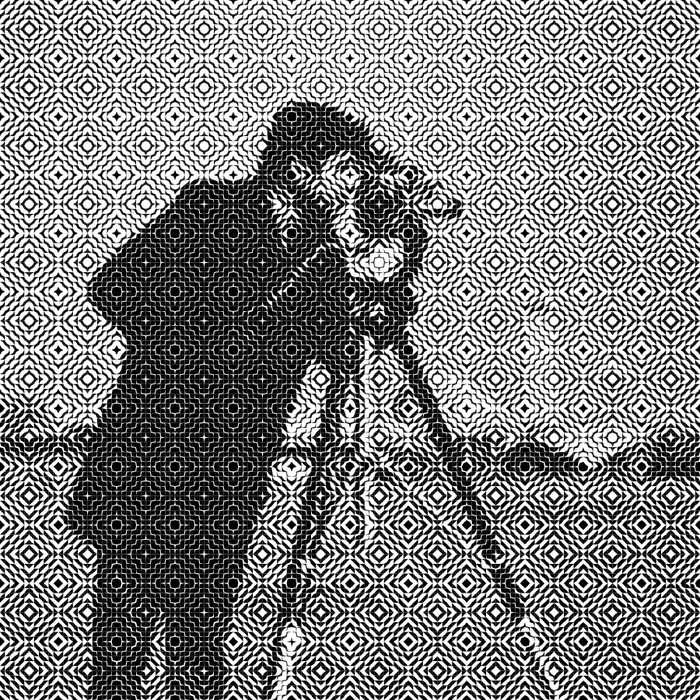
The one thing to understand first
The grid is the resolution. An n × m grid of tiles carries exactly n × m
brightness values. --resolution changes how large the output file is, but it
adds no detail whatsoever — a 96×96 grid rendered at 4000 pixels is a very
large picture of 9216 tones.
So -n is the control that decides whether your image is recognizable, and
-r only decides how big the file is. If the render looks too coarse, raise
-n, not -r.
Usage
truchet [OPTIONS] <INPUT> [OUTPUT]
<INPUT> is any PNG, JPEG, TIFF, or BMP. [OUTPUT] defaults to the input name
with a -truchet.png suffix.
Options
Sizing the grid
| Option | Default | Meaning |
|---|---|---|
-n, --size <N> |
96 | Tiles along the image’s long edge |
-N, --repeats <N> |
— | Whole pattern repeats along the long edge |
-n and -N are mutually exclusive; supplying both is an error. They answer
different questions:
-n 144— “give me 144 tiles across,” which may cut the pattern off partway through its final repeat.-N 8— “give me 8 complete pattern blocks across.” The tile count is derived by multiplying by the pattern’s period, so the block is never truncated.
Use -N when the pattern’s integrity matters, -n when the tonal resolution
matters.
Choosing a pattern
-p, --pattern <NAME> (default random)
| Name | Period | Appearance |
|---|---|---|
random |
1×1 | Independent draw per cell; no visible pattern, pure texture |
alternating |
2×2 | Checkerboard |
truchet_a |
— | Uniform diagonal grain |
truchet_c |
— | Diagonal stripes |
truchet_d |
— | Pinwheels |
truchet_e |
— | Dense weave |
douat_72 |
12×12 | Concentric diamond medallions |
A large-period pattern needs room to repeat. It wants at least ~4 repeats
across the image and ideally 8, or it competes with the picture instead of
texturing it. douat_72 has a 12×12 period, so -n 96 gives it exactly 8
repeats — which is why 96 is the default.
This is the single most common way to get a disappointing render: choosing
douat_72 and a low -n, so that three enormous medallions sit on top of the
photograph and obscure it.
Controlling tone
-t, --tone <LO,HI> (default 0.15,0.85)
The blackest tile is HI black and the whitest is LO black. Narrowing the
range flattens contrast; widening it toward 0,1 lets tiles go fully black and
fully white, which reads as harsher.
Raising LO is tempting as a way to lighten a render, but it backfires: it
puts ink into what should be blank paper, so the pattern fills the empty areas
and swamps the subject. If a render looks too dark, reduce -n or pick a
lighter pattern before touching -t.
Output size
-r, --resolution <PIXELS> (default 2000) — output width in pixels.
Note for anyone comparing against Julia. Rust’s
-r Nproduces an image exactly N pixels wide. Julia’s-r Nproduces one 2N pixels wide, because Makie specifies figures in points and saves atpt_per_unit=2. Double the Julia value, or halve the Rust one, when comparing. This is a leak of a Makie implementation detail, and was deliberately not reproduced.
Randomness
--seed <N> — makes random patterns reproducible.
Reproducible within the Rust implementation only. It does not reproduce Julia’s output for the same seed; the two use different generators. Patterns and intensities do match — see Fidelity.
Color
-c, --color (alias --colour) turns on additive RGB rendering. Each tile is
inked red, green, or blue instead of black, matching that channel’s value at its
own pixel, composited additively on a black ground.
| Option | Default | Meaning |
|---|---|---|
--channels <MODE> |
position |
position assigns by mod1(i+j,3); variant assigns from the pattern’s motifs |
--inks <R,G,B> |
red,lime,blue |
Three ink colors in channel order (any CSS color) |
--background <COLOR> |
black |
Background for a color render |
All three require --color.
Color needs a color source. Each tile takes its ink from one channel of its own pixel. On a grayscale image all three channels are equal, so the result can only ever be a dim, noisy gray — the feature will appear broken when it is merely starved. The example below uses the mandrill precisely because its red nose and blue cheeks give the three channels something to differ about:
truchet --color -n 160 -p douat_72 mandrill.png colour.png
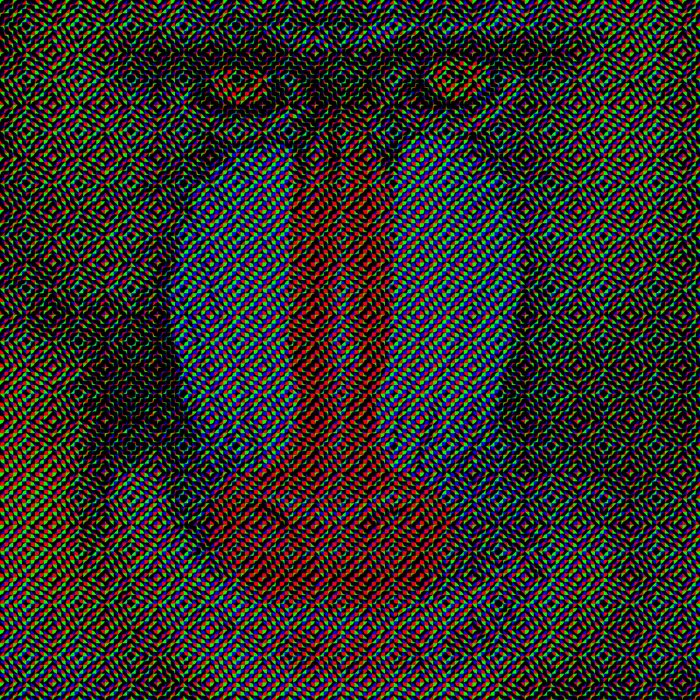
Additive color on black is inherently darker than the black-and-white render. That is the design, not a defect.
Colors are parsed as CSS, the same as ariadne:
named colors, #rgb / #rrggbb, rgb(), hsl(), and the rest of Color Level 4.
Commas inside a functional color are not treated as separators, so
--inks 'rgb(255,0,0), lime, blue' is three inks, not five.
The green ink is lime, not green. CSS green is half intensity
(#008000) while red and blue are full, which makes the additive triple
asymmetric: measured here, the green channel drops from 43.0 to 21.6 and the
mandrill’s green fur fades out of the picture. lime is the full-intensity
#00ff00 an additive triple requires, and it is the default.
Keep --background dark. The ink is additive, so it can only ever lighten
the ground it sits on. Against a light background there is nothing left to add:
--background white renders an essentially blank image, with no error and no
warning. Custom --inks are fine — they work as expected against the default
black — but a light --background defeats the compositing model rather than
inverting it.
Inspection
--dry-run reports the resolved grid and exits without rendering.
Worked examples
Default — random tiles
truchet -n 96 cameraman.png
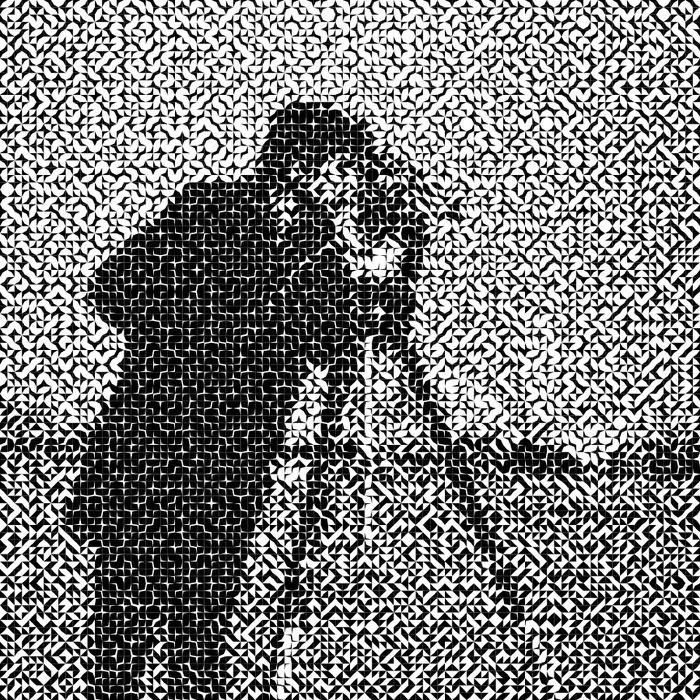
No pattern, so the texture is pure noise and the tonal structure carries the image on its own. A good baseline for judging what a pattern is contributing.
A historical pattern at proper density
truchet -n 144 -p douat_72 cameraman.png
144 tiles gives the 12×12 medallion 12 repeats — dense enough to read as texture rather than as competing subject matter.
Pinwheels
truchet -n 96 -p truchet_d cameraman.png
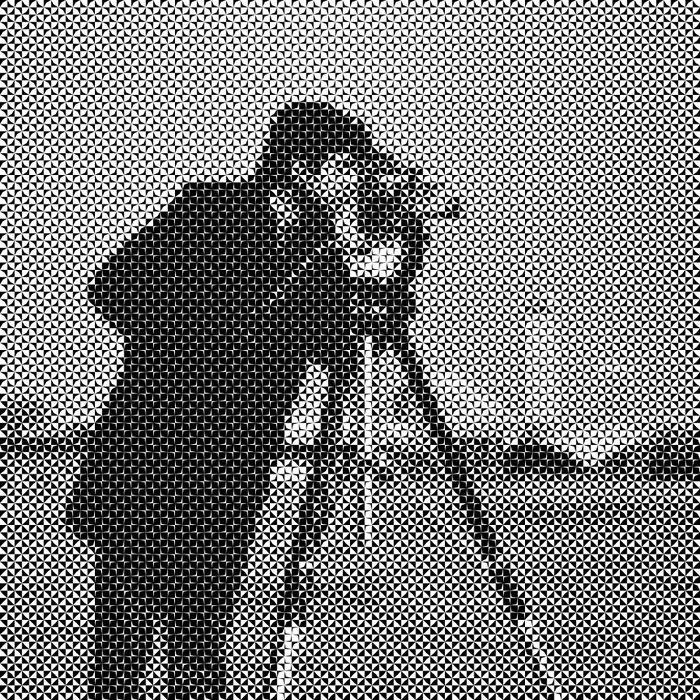
truchet_d has a short period, so it stays legible as texture even at lower
tile counts.
Troubleshooting
The picture is unrecognizable. Raise -n. Remember that -r cannot help;
the grid is the resolution.
The pattern overwhelms the picture. Either raise -n so the pattern repeats
more often, or switch to a shorter-period pattern. Use -N 8 to guarantee eight
clean repeats.
A color render is dim and gray. The source is grayscale, or nearly so. Additive RGB needs a saturated color source.
Output is a different size than Julia’s. Expected — see the -r note above.